TL;DR
The biometric attendance market is crowded, and most platforms oversell on features while underdelivering on the basics. What actually matters is straightforward - real time sync from device to dashboard, clean payroll integration, multi-location support, and self-service tools that reduce the daily load on HR teams. This guide breaks down the 14 features worth evaluating before signing a contract, the critical mistakes organisations make during procurement, and what separates a platform built for enterprise use from one that looks good in a demo.
Introduction
Cloud based biometric attendance systems have moved from being a nice add on to becoming core HR infrastructure. Companies no longer want to manage spreadsheets, manual registers, or disconnected biometric devices that only work on a local server. The global biometric attendance system market reached $3.25 billion in 2024 and is projected to grow to $6.78 billion by 2033, with organizations worldwide expected to adopt biometric attendance systems at a rate exceeding 60% by 2027.
But the market is crowded with tools that promise automation and end up delivering dashboards that look impressive but solve very little. Buying the wrong system locks you into hardware, frustrates HR teams, and confuses employees who just want to see their hours and leave balance clearly.
This guide breaks down what to look for before you buy a cloud based biometric attendance system, with features that matter for both managers and employees.
What Is a Cloud Based Biometric Attendance System
A cloud based biometric attendance system records employee attendance using biometric devices like fingerprint or face recognition, then syncs the data to a cloud platform.
Unlike traditional on-premise systems, cloud platforms centralize attendance data across offices, branches, and remote teams. HR teams can view attendance, manage shifts, approve leaves, and export reports without installing local software or managing servers.
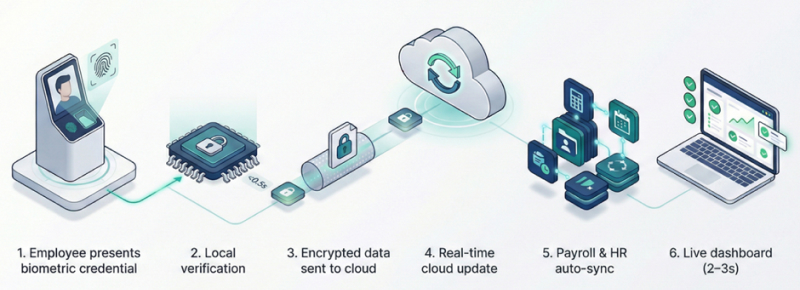
How Attendance Records Sync to Cloud
Employee presents facial biometric credential in front of the machine
Device captures and verifies against stored template (happens locally in <0.5 seconds)
Attendance record transmits to cloud via encrypted connection
Cloud database updates in real-time across all locations
Data flows automatically to integrated payroll/HR systems
Managers see updated status on dashboard within 2 to 3 seconds
The biggest benefit is real time visibility. Attendance data flows instantly from the device to the dashboard, reducing payroll errors, manual corrections, and proxy attendance.
Administrative Control Features
Real-Time Attendance Dashboard
The central dashboard provides administrators with an instant overview of their workforce. At a glance, admins can monitor check-in/out statuses, identify late arrivals or early departures, and stay informed about team milestones, such as employee birthdays.
What it includes:
Live status showing who is checked in, late, or absent
7-day attendance trend visualizations with bar graphs
Birthday and anniversary notifications
Overtime alerts and exceptions
Why it matters: Real-time insight into attendance metrics enables proactive workforce optimization. Managers can identify patterns, respond to no-shows immediately, and make informed staffing decisions.
Dynamic Shift Management
Admins and HR representatives can modify shifts for individuals or entire teams simultaneously. The software automatically updates schedules in real-time, ensuring that attendance records accurately reflect the new shift timings the moment an employee clock in or out.
What it includes:
Bulk shift assignment for multiple employees
Flexible scheduling across time zones
Automatic shift rotation capabilities
Real-time status updates when shifts begin
Why it matters: Organizations with complex scheduling needs waste hours updating individual employee shifts. Bulk management reduces administrative overhead by 60-70%.
Bulk Leave Processing
Streamline leave management by importing monthly leave quotas for the entire workforce at once. The system supports automated accruals based on custom company policies, including "carry-forward" logic for unused leave balances.
What it includes:
Excel/CSV import for mass leave quota updates
Automated monthly leave accrual
Company-wide policy enforcement
Leave balance calculations
Why it matters: Adding leave allowances individually for hundreds of employees is inefficient. Automating attendance tracking slashes administrative overhead and minimizes manual payroll corrections.
Multi-Location Holiday Management
HR teams can configure unlimited holiday calendars. This feature allows for the designation of optional vs. compulsory holidays and supports branch-specific calendars to accommodate regional or international locations.
What it includes:
Branch-specific holiday calendars
Compulsory vs. optional holiday designation
Regional compliance support
Automated holiday roster generation
Why it matters: Organizations operating across regions need systems that respect local holidays and cultural differences. This prevents payroll errors and maintains employee satisfaction.
Roles-based Access Control
Using Role-Based Access Control (RBAC), super-admins and executives can define precise permissions. Set specific viewing, editing, exporting, or importing rights for different roles to ensure data security and privacy compliance.
What it includes:
Role-based permissions (view-only, edit, approve)
Department-level data segregation
Audit trails for all access and changes
Custom role creation
Why it matters: Sensitive attendance and payroll data requires strict access controls. Robust integration with existing HRIS and payroll systems accelerates ROI and supports strategic workforce planning.
Rapid Employee Onboarding
HR can upload comprehensive employee details via Excel or CSV, creating hundreds of profiles in seconds rather than filling out individual software forms.
What it includes:
Bulk employee import via spreadsheet
Automatic user ID generation
Biometric enrolment workflows
Welcome email automation
Why it matters: Manual employee data entry is time-consuming and error-prone. Companies hiring at scale need systems that onboard hundreds of employees in minutes, not days.
Centralized Request Management
Admins can process pending leaves, attendance corrections, and web punches for the entire month in a single click. Located just one scroll down from the main login, this feature ensures high-speed approvals and prevents payroll bottlenecks.
Also Read: Struggling with Month-End Attendance Mess? Here's Why.
What it includes:
Unified inbox for leave requests, overtime approvals, and attendance corrections
One-click approval/rejection
Automated notification to employees
Request history and audit trails
Why it matters: Centralized management reduces response time and improves transparency.
Employee Transparency Features
Attendance Wizard Calendar
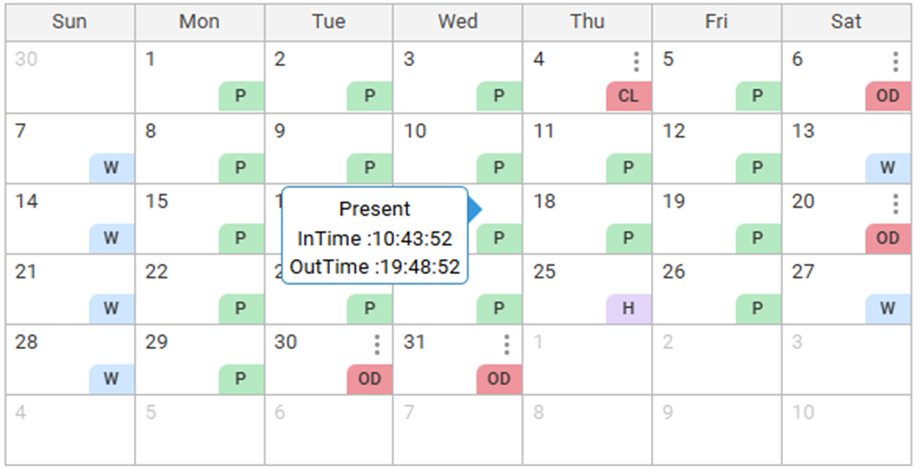
A comprehensive calendar view displays the month's attendance history at a glance. Employees can request leave by simply clicking on an "absent" date; the system then intelligently suggests "Paid" or "Unpaid" options based on their remaining balance. Hovering over any date reveals exact clock-in/out timestamps.
What it includes:
Visual calendar showing present, absent, leave, and holiday statuses
Hover-over details with exact clock-in/out times
Direct leave request submission from absent dates
Color-coded status indicators
Why it matters: Employees need visibility into their attendance records to identify discrepancies early. Self-service reduces HR inquiries by 40-50%.
Request Status Tracking
This feature provides a live view of all submitted requests. Employees can track the status of leave applications and attendance corrections in real-time, seeing exactly what is pending, approved, or rejected.
What it includes:
Real-time status updates (pending, approved, rejected)
Notification when requests are processed
Rejection reason display
Request history
Why it matters: Transparency builds trust. When employees can track their requests without asking HR, it reduces friction and improves satisfaction.
Live Leave Balance Display
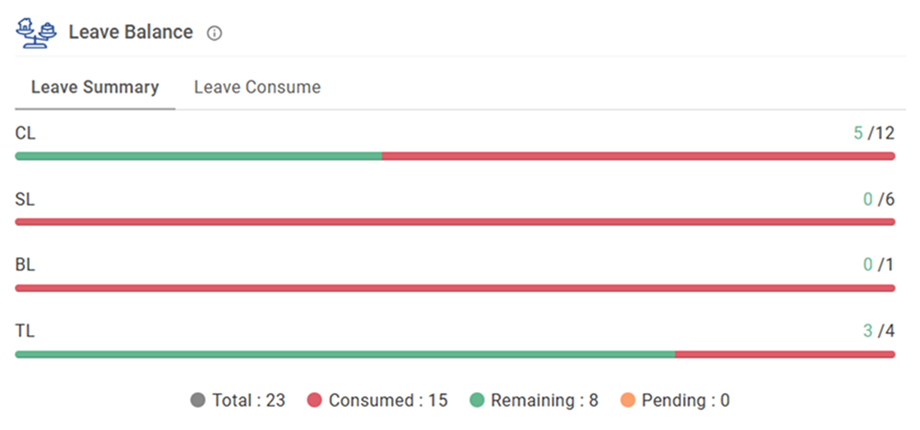
Employees can view their total leave entitlements through a clear, color-coded interface. A "red and green" progress bar visually distinguishes between consumed leave and remaining balance, helping employees plan time off responsibly.
What it includes:
Real-time consumed vs. remaining leave counters
Visual progress bars or gauges
Breakdown by leave type (sick, vacation, personal)
Projected balance based on pending requests
Why it matters: Biometric systems track task completion times and improve accountability by capturing real-time data on work hours, overtime, and leaves. Employees can plan time off without constant HR inquiries.
Comprehensive Reporting
Empower employees with direct access to their data. Users can download various reports, including daily logs, attendance trends, overtime summaries, and monthly totals, ensuring complete transparency regarding their worked hours.
Also Read: How to Prepare MIS Report from Cloud-Based HR Software?
What it includes:
Downloadable monthly attendance summaries (PDF/Excel)
Overtime and late-arrival reports
Leave utilization analysis
Absenteeism trend charts
Why it matters: Data transparency fosters accountability. Employees who can access their own reports are more engaged and responsible about attendance.
Employee Self-Service Portal
A dedicated portal that consolidates all HR-related data. Employees can track their history from their date of joining, review insurance details, manage documents, and view organizational charts for their current team.
What it includes:
Personal information management
Document uploads (insurance, certificates)
Team directory and organizational chart
Why it matters: Self-service empowers employees and reduces HR workload. Companies typically save 10-20% in labour costs within the first year of deployment by automating routine tasks.
Productivity & OKR Tracking
This feature aligns attendance with performance. Employees can manage assigned tasks, track deadlines, and Monitor Key Results (KRs). It provides a clear record of monthly achievements and task completion rates.
What it includes:
Task management dashboard with deadline configurations
Key Results (KRs) progress monitoring
Monthly achievement logs and completion rate summaries
Direct alignment between attendance data and output milestones
Why it matters: This feature bridges the gap between "being present" and "being productive." By aligning attendance with performance, managers can identify high-performers versus those physically present but mentally disengaged (presenteeism). It provides an objective, data-driven basis for performance reviews and bonus allocations.
Swift Conference Room Booking
Employees can reserve conference rooms directly through the software. The system shows real-time availability to prevent scheduling conflicts, allows for participant invites, and ensures smooth communication for urgent or planned meetings.
What it includes:
Real-time room availability calendar with visual slot management
Integration with team invites and automated email notifications
Support for recurring meeting schedules
Mobile-accessible booking interface for on-the-go reservations
Why it matters: Manual room booking is a common source of workplace friction and "meeting room poaching." Automating this within your attendance software ensures that staff are already authenticated and can book space as soon as they clock in. It streamlines office operations and eliminates the administrative "miscommunication" that leads to double-booked conference rooms.
Critical Mistakes to Look Out
Choosing Features Over Integration
The mistake: Selecting a system with impressive features that doesn't integrate with existing payroll software.
The fix: Prioritize seamless integration. Robust integration with existing HRIS and payroll systems accelerates ROI.
Ignoring Offline Capabilities
The mistake: Assuming internet connectivity is always available.
The fix: Verify devices store data locally and sync automatically when connection is restored.
Inadequate Change Management
The mistake: Rolling out a new system without employee buy-in.
The fix: Communicate benefits clearly, address privacy concerns transparently, and provide hands-on training.
Overlooking Compliance Requirements
The mistake: Not checking if the system meets industry-specific regulations (HIPAA, GDPR, labour laws).
The fix: Verify compliance certifications and configure the system to enforce legal requirements automatically.
Underestimating Training Needs
The mistake: Assuming the system is "intuitive" and requires no training.
The fix: Budget for comprehensive training for HR staff, managers, and employees. Record sessions for future reference.
Which Cloud Based Biometric Attendance System Should You Buy
A cloud based biometric attendance system should meet three conditions.
First, it should integrate smoothly with biometric hardware and mobile apps. Cloud without reliable device sync is just another dashboard.
Second, it should scale across branches, time zones, and thousands of employees without manual configuration for each location.
Third, it should integrate with payroll, HRMS, and ERP tools. Attendance data is only useful when it flows into salary processing and compliance workflows.
If a vendor cannot show real time dashboards, policy automation, role-based access, and bulk workflows, it is not ready for enterprise use.
Conclusion
Buying a cloud based biometric attendance system is a workflow decision that affects HR, finance, managers, and employees every day.
The right system reduces admin work, improves transparency, and gives leadership visibility into workforce patterns. The wrong system becomes another tool people bypass with spreadsheets and manual approvals.
Before signing a contract, verify that the system supports real time dashboards, flexible shifts, automated leave policies, role-based permissions, employee self-service, and exportable reports and has a high rating in both Google Play Store and Apple App Store. Those features separate serious platforms from basic ones.
Frequently Asked Questions
Cloud architecture is designed to unify data from every biometric terminal into a single dashboard. You can set location-specific policies, holidays, and compliance rules while maintaining centralized reporting.
Professional cloud systems export data in formats compatible with major payroll platforms (ADP, Workday, UKG, Paychex). Many offer pre-built integrations that sync data automatically, eliminating manual entry.
Advanced systems process individuals in less than a second and use AI to adapt to varying environmental conditions. Modern facial recognition works in low light, with glasses, and even with minor facial changes (beard growth, etc.).
Biometric systems eliminate buddy punching because biological markers are unique to each individual. Some employees attempt workarounds like photos (for facial recognition), but quality systems use liveness detection to verify a real person is present.