TL;DR
Most field sales teams are operating on trust, phone calls, and end-of-day reports that nobody verifies. A field sales tracking app changes that - every visit, route, order, and check-in becomes structured, timestamped data that managers can act on in real time. This guide covers exactly how the technology works under the hood, what separates a serious platform from a basic location pinger, and what features to verify before signing a contract.
Introduction
Managing a field sales team without a tracking app is like running a delivery fleet without GPS - you know people are out there, but you have no idea if they are on the right route, visiting the right clients, or closing the right deals.
The field sales automation market was valued at approximately $3.8-4.8 billion in 2024, with projections reaching $9-11 billion by 2032-2033 according to leading research firms. The reason is simple: companies can no longer afford to operate blind when competitors are gaining real-time insights into their field operations.
But not every field sales tracking app often fails at the fundamentals - accurate location capture, offline functionality, and clean data integration with CRM or ERP systems. This guide explains exactly how a field sales tracking app works, what technologies power it, and which features separate a serious platform from a glorified check-in tool.
What is a Field Sales Tracking App
A field sales tracking app is a mobile and web-based platform that monitors, records, and optimizes the daily activities of sales representatives who work outside the office - visiting clients, distributors, retail stores, or prospects in the field.
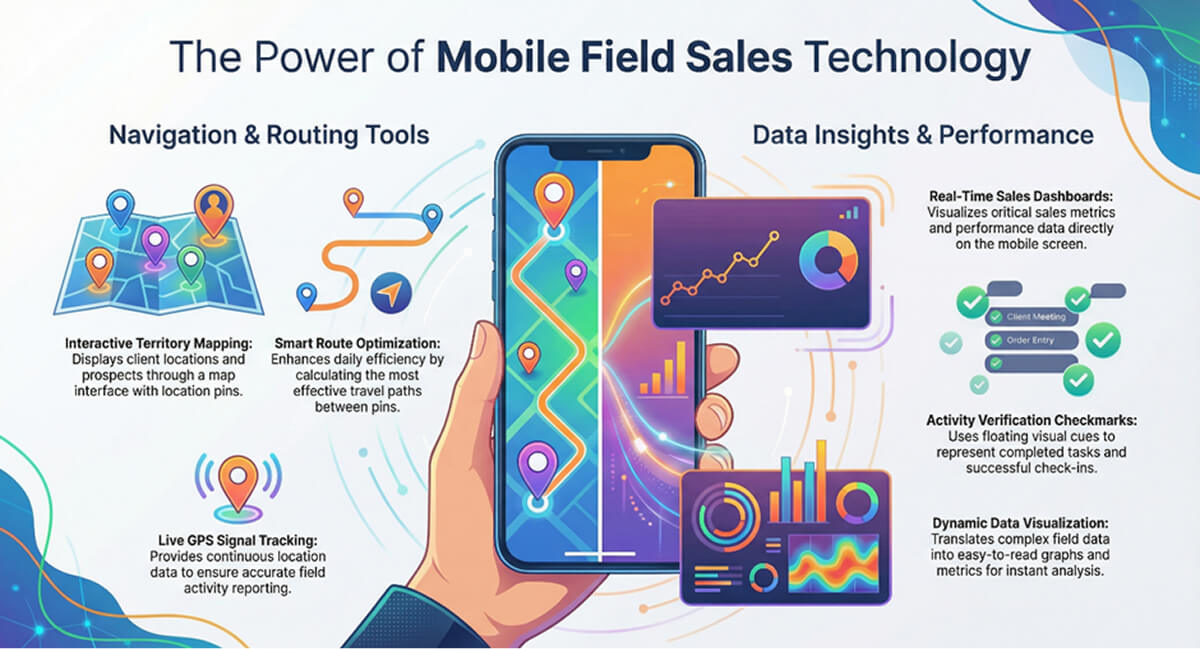
Unlike traditional CRMs that focus on pipeline management from a desk, field sales tracking apps are built around movement, location, and real-time activity capture. They combine GPS tracking, geofencing, route optimization, digital order entry, and performance analytics into a single platform accessible to both field reps (via a mobile app) and managers (via a web dashboard).
The primary purpose is answering three questions that traditional systems cannot:
Where are my reps right now?
What are they doing?
Are they achieving targets?
The best systems go beyond simple location pinging. They create a digital audit trail of every client visit, every order placed, every expense logged, and every kilometre driven - turning raw field data into workforce intelligence.
How Does a Field Sales Tracking App Work
Understanding the technology behind a field sales tracking app removes the mystery and helps you evaluate whether a vendor's system is genuinely robust or just a GPS pin on a map.
Step
GPS Location Tracking Activates
When a sales representative starts their workday, they open the mobile app and clock in. The app uses a combination of GPS satellites, cell tower triangulation, and Wi-Fi positioning to determine precise location - accurate to within 5-10 meters in urban areas.
The app then begins periodic location logging. Most systems capture location data every 5 –15 minutes during work hours, transmitting to cloud servers via encrypted connections using HTTPS and TLS 1.3.
Step
Sales Rep Navigates to Client Location
The rep views their daily schedule within the app. Advanced apps use AI-powered route optimization considering:
Real-time traffic conditions
Client availability windows
Visit priority scores
Historical visit duration data
Distance between locations
The rep taps a client name and the app launches turn-by-turn navigation - navigation through integrated mapping services (Google Maps, Apple Maps, or proprietary routing engines). This navigation integrates seamlessly-no need to switch apps or manually enter addresses.
Step
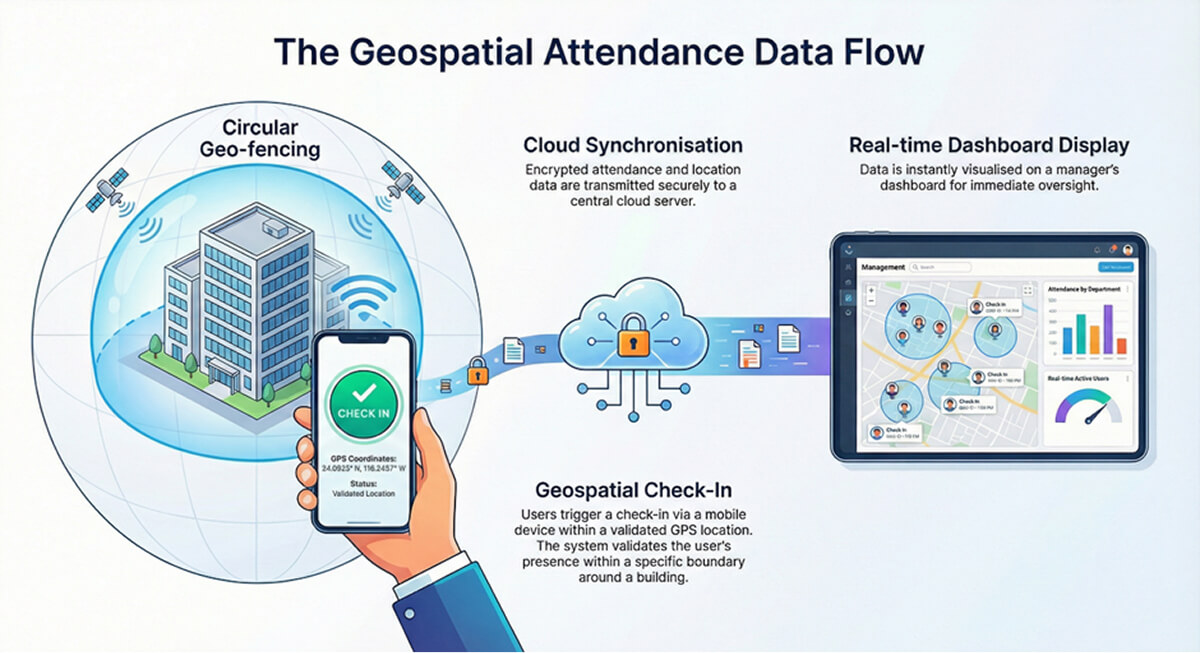
Geo-Fenced Check-In at Client Location
When the rep arrives, geo-fencing detects proximity within 50–200 meters and activates the check-in button. Tapping it captures:
Exact GPS coordinates (latitude/longitude)
Timestamp (date and time)
Device ID (to prevent fake check-ins)
Network status (online/offline mode)
Some systems require additional verification - selfie capture, QR code scan, or Bluetooth beacon detection - to prevent ghost visits.
Step
Meeting Activity & Data Capture
During the client meeting, the app serves as a mobile CRM. The rep can:
Log meeting notes and action items
Capture photos of products, displays, or competitor activity
Record voice memos for later transcription
Create orders directly within the app
Update client contact information
Mark visit outcomes (demo completed, order placed, follow-up required)
All entry happens through mobile-optimized interfaces with voice-to-text and auto-complete to minimize typing mid-conversation.
Step
Check-Out & Visit Completion
When the meeting concludes, the rep taps “Check Out.” Visit duration is calculated automatically - flagged for review if under 5 minutes.
Some apps enforce mandatory data entry before check-out, requiring visit outcome classification, order value, or client purchase intent rating to ensure data completeness.
Step
Real-Time Data Sync to Cloud
All captured data - GPS coordinates, timestamps, notes, photos - immediately syncs to cloud servers using minimal bandwidth through data compression.
In poor connectivity areas, the app switches to offline mode, storing data locally in an encrypted database and uploading automatically when connection is restored. Zero data loss guaranteed.
Step
Manager Dashboard Updates Instantly
The dashboard refreshes every 30–60 seconds. Managers see:
Live map view of all field reps
Visit completion status (planned vs. completed)
Activity timeline per rep
Performance metrics (conversion rates, order values)
Alerts for anomalies (missed visits, short durations, off-route deviations)
Color coding - green for on-track, yellow for warnings, red for exceptions - lets managers spot problems instantly without reading detailed reports.
Step
Analytics & Reporting Engine Processes Data
Behind the scenes, the analytics engine continuously processes incoming data to generate insights:
Territory coverage analysis: Which areas are being visited vs. neglected
Time utilization breakdown: How much time is spent traveling vs. in client meetings
Performance trends: Weekly/monthly comparison of visit counts, conversion rates, and revenue
Predictive recommendations: AI suggestions for optimal visit frequency, best time to contact specific clients, or which clients need urgent attention
These insights power automated reports - daily summaries, weekly performance reviews, and monthly territory analysis - delivered via email or accessible through web dashboards.
Benefits for Sales Representatives
While managers focus on visibility and control, field reps care about tools that make their daily work easier, not more bureaucratic.
Reduced Administrative Burden
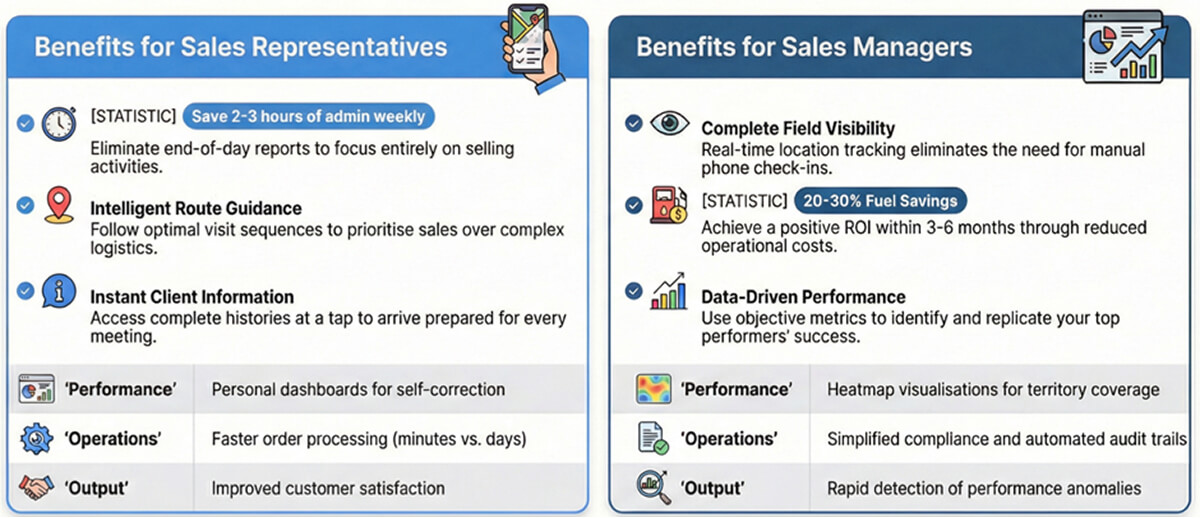
Automatic visit logging, GPS-based check-ins, and mobile data entry eliminate the need for end-of-day manual reporting. Reps save 2-3 hours weekly previously spent on paperwork.
Intelligent Route Guidance
No more wasting time planning routes or getting stuck in traffic. The app suggests optimal visit sequences and provides turn-by-turn navigation, allowing reps to focus on selling instead of logistics.
Instant Access to Client Information
Complete client history, previous orders, pending issues, and contact details available at a tap. Reps arrive prepared for every conversation, improving meeting quality and conversion rates.
Performance Transparency
Personal performance dashboards showing visit counts, conversion rates, and achievement against targets. Data-driven visibility helps reps self-correct and improve without waiting for manager feedback.
Faster Order Processing
Creating orders on the spot, checking inventory availability, and confirming delivery dates directly with clients reduces order cycle time from days to minutes, improving customer satisfaction and repeat business.
Benefits for Sales Managers
The manager-side benefits are where field sales tracking apps deliver measurable ROI.
Complete Field Visibility
Know exactly where every rep is at any moment, what clients they're visiting, and how long they're spending at each location. This visibility eliminates the need for constant phone check-ins and enables proactive support.
Data-Driven Performance Management
Objective metrics replace subjective impressions. Identify top performers (and replicate their behaviours), spot underperformers (and coach them), and make territory reassignments based on actual productivity data.
Rapid Exception Detection
Automated alerts for anomalies-reps not starting their day on time, missed scheduled visits, unusually short meetings, or extended idle periods. Managers can intervene immediately rather than discovering problems weeks later.
Optimized Territory Coverage
Heatmap visualizations reveal which areas receive frequent visits and which are neglected. Rebalance territories to ensure even coverage, prevent client neglect, and maximize market penetration.
Simplified Compliance & Auditing
Complete audit trail of every field activity-who visited which client, when, for how long, and what was discussed. Essential for industries with strict compliance requirements (pharmaceuticals, financial services, regulated markets).
Reduced Operational Costs
Route optimization alone cuts fuel costs by 20-30%. Eliminating ghost visits prevents wasted mileage reimbursements. Automated reporting reduces admin staff workload. Most organizations achieve positive ROI within 3-6 months.
Conclusion
A field sales tracking app works by turning every field activity - attendance, travel, client visits, orders, and expenses - into structured, verifiable, and actionable data. It uses GPS, geofencing, cloud sync, and mobile-first design to bridge the gap between what happens in the field and what managers see on their dashboards.
Before committing to a vendor, verify that the system supports real-time GPS tracking, geofenced attendance and visit verification, AI-powered route optimization, digital order entry, offline mode, expense management, custom forms, and integration with your CRM or ERP. Those capabilities separate operational field platforms from basic tracking tools.
Your field team is your most expensive and most impactful sales channel. Give them a system that makes every visit count.
Frequently Asked Questions
The app uses the smartphone's GPS chip combined with Wi-Fi and cell tower triangulation to determine the rep's location. This data is captured at regular intervals (every 30�60 seconds) and transmitted to the cloud where it is plotted on a live map. Modern apps achieve 5�15 meter accuracy in open areas and use geofencing to verify proximity to client locations.
Quality field sales apps include anti-spoofing technology that detects mock location apps and VPNs. Additionally, geofenced visit verification requires the rep's device to be physically within a configured radius of the client site. Photo capture with geotagged metadata adds another layer of verification. Most serious platforms flag anomalies automatically for manager review.
The app stores all data locally on the device - check-ins, orders, forms, photos, and GPS breadcrumbs. Once the device reconnects to the internet, data syncs automatically to the cloud in chronological order. No manual intervention is required, and no data is lost.
Most compliant apps track location only during working hours (from clock-in to clock-out). After the rep marks end-of-day, GPS tracking stops completely. Data access is controlled through role-based permissions, and reps can see exactly what data is captured about them through the app's transparency features.
Comments